We Use CookiesWe use cookies to enhance the security, performance, functionality and for analytical and promotional activities. By continuing to browse this site you are agreeing to our privacy policy

10 Best Portable Document Scanners 2025 in the United States

How do we rank products for you?

Our technology thoroughly searches through the online shopping world, reviewing hundreds of sites. We then process and analyze this information, updating in real-time to bring you the latest top-rated products. This way, you always get the best and most current options available.

headphones-stars

Our Top Picks

#1

Winner

Epson WorkForce ES-50 Portable Sheet-Fed Document Scanner for PC and Mac

Rating
10.0
Chosen by1,390
Resolution
Scanning Speed
Portability

Most important from
5684 reviews

Resolution
For color photos, this unit is great but struggles with old, glossy, black and white photos.
Scanning Speed
Scanned almost 2000 photos without issues; it's inexpensive, portable, and plenty fast.
Portability
Smaller to tuck away when done with it, and easy to use.
Document Handling
Perfect for scanning items to your computer without the hassle of a huge printer/scanner.
Software and Compatibility
The app appears outdated and crashes on larger files, but this can be worked around by saving files and using other photo editing apps.

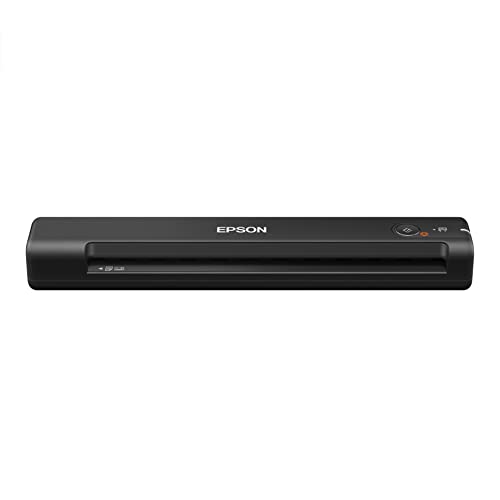
The Epson WorkForce ES-50 is a strong contender in the portable document scanner category. One of its standout features is its speed, capable of scanning a single page in as little as 5.5 seconds, making it suitable for users who need quick scans on the go. Additionally, its lightweight design (0.59 pounds) enhances its portability, making it easy to carry around in a bag or briefcase. The scanner's resolution of 1200 DPI is quite good for most document scanning needs, ensuring clear and detailed scans.

The device supports a variety of document types and sizes up to 8.5 x 72 inches, which is quite versatile for a portable scanner. It's also capable of handling ID cards and receipts, adding to its usefulness for business travelers and mobile professionals. Connectivity is straightforward with a USB interface, which also powers the device, eliminating the need for batteries or an external power supply. This makes it convenient to use with a laptop on the go. The included Epson ScanSmart Software and Nuance OCR are great additions, providing tools to easily organize documents and convert them into searchable PDFs or editable Word and Excel files.

Compatibility with both Windows and Mac, along with the inclusion of a TWAIN driver, ensures it can work with most users' existing systems and software. However, it’s worth noting that the document feeder is manual, which might not be ideal for bulk scanning tasks as it requires individual feeding of each sheet. Users looking for automatic multi-page document handling might find this aspect limiting. Additionally, while the USB connectivity is simple, users who prefer wireless connections may find this setup less convenient. In conclusion, the Epson WorkForce ES-50 is best suited for individuals needing a portable, fast, and reliable scanner for occasional use rather than high-volume scanning tasks.

Rating
10.0
Chosen by1,390
Resolution
Scanning Speed
Portability

Most important from
5684 reviews

Resolution
For color photos, this unit is great but struggles with old, glossy, black and white photos.
Scanning Speed
Scanned almost 2000 photos without issues; it's inexpensive, portable, and plenty fast.
Portability
Smaller to tuck away when done with it, and easy to use.
Document Handling
Perfect for scanning items to your computer without the hassle of a huge printer/scanner.
Software and Compatibility
The app appears outdated and crashes on larger files, but this can be worked around by saving files and using other photo editing apps.
#2

Brother DS-640 Compact Mobile Document Scanner, (Model: DS640) 1.5"x2"x11.9"

Rating
9.1
Portability
Software and Compatibility

Most important from
6297 reviews

Portability
Compact and lightweight design makes it a perfect companion for scanning documents on the go.
Software and Compatibility
The bundled software offers a clean, user-friendly interface with no fuss.

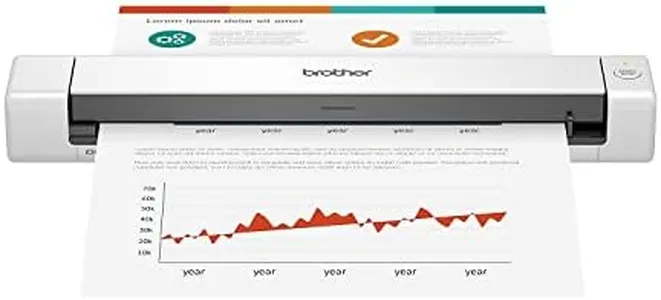
The Brother DS-640 is a compact and lightweight portable document scanner designed for professionals who need to scan documents on the go. It offers a resolution of 300 dpi, which is sufficient for clear text and image scans but might not capture fine details as well as higher-end models. The scanner can process documents at speeds up to 16 pages per minute, making it fairly quick for its size and helping save time during busy workdays.

Connectivity is straightforward with USB powering and data transfer, allowing you to plug it into your laptop or PC without needing an external power source. This makes it very portable and suitable for mobile use. However, it only scans one sheet at a time, so it’s best suited for smaller scanning tasks rather than large batches of documents. The DS-640 handles a variety of document sizes, including long receipts, invoices, business cards, and plastic IDs, which adds flexibility for different scanning needs.

Its bundled software supports multiple scan-to options such as saving files, sending emails, or uploading to cloud services, and includes useful features like OCR to convert scanned text into editable documents. Compatibility extends across Windows, Mac, and Linux systems. The scanner’s compact size and ease of use are strong points, though the single-sheet feeding and average resolution may limit its appeal for users needing fast, high-volume scanning or ultra-high-quality images. It is ideal for students, remote workers, or anyone requiring reliable, portable scanning for occasional to moderate use rather than heavy office scanning. The one-year warranty and responsive support provide added assurance for buyers.

Rating
9.1
Portability
Software and Compatibility

Most important from
6297 reviews

Portability
Compact and lightweight design makes it a perfect companion for scanning documents on the go.
Software and Compatibility
The bundled software offers a clean, user-friendly interface with no fuss.
#3

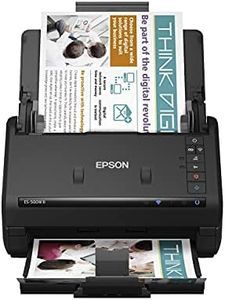
Epson Workforce ES-500W II Wireless Color Duplex Desktop Document Scanner for PC and Mac, with Auto Document Feeder (ADF) and Scan from Smartphone or Tablet

Rating
9.1
Resolution
Scanning Speed
Connectivity

Most important from
1229 reviews

Resolution
The color scanning option is great, and although setup might need some technical assistance, it only takes a few minutes.
Scanning Speed
This scanner is one of the really good ones, scanning at 35 pages per minute as advertised, and handling both single and double-sided documents seamlessly.
Connectivity
However, for those relying on wireless functionality, the scanner's software limitations, particularly the 15-minute timeout, can be a significant inconvenience.
Document Handling
The 50-page document feeder is robust, easily accommodating over 60 pages, and allows continuous scanning for large files without any hassle.
Software and Compatibility
The software automatically rotates scanned pages and remembers file destinations, making file management straightforward and intuitive.

The Epson Workforce ES-500W II is a versatile document scanner that offers several impressive features. One of its main strengths is its wireless capability, allowing you to scan directly to smartphones, tablets, computers, and cloud storage with ease. This is facilitated by the Epson Smart Panel mobile app. The scanner is also quite fast, capturing both sides of a document in a single pass at up to 35 pages per minute (ppm) or 70 images per minute (ipm). The robust 50-sheet Auto Document Feeder (ADF) is another plus, handling various paper types and sizes efficiently.

Additionally, the scanner includes powerful software such as the Epson ScanSmart, which offers features like automatic file naming and the ability to create searchable PDFs and editable Word/Excel files using Optical Character Recognition (OCR). This makes file management and document digitization streamlined and efficient. The device also ensures reliable paper feeding with Ultrasonic Double Feed Detection, preventing missed pages and damage from staples.

However, there are some drawbacks. The scanner's resolution is 300 dpi, which may be lower than some high-end models that offer higher resolution for more detailed scans. Also, at 8.1 pounds, it is not the lightest option available, which may affect portability for users who need to frequently move the device. Despite these minor issues, the Epson Workforce ES-500W II is a solid choice for users looking for a reliable and fast document scanner that integrates well with various devices and cloud services.

Rating
9.1
Resolution
Scanning Speed
Connectivity

Most important from
1229 reviews

Resolution
The color scanning option is great, and although setup might need some technical assistance, it only takes a few minutes.
Scanning Speed
This scanner is one of the really good ones, scanning at 35 pages per minute as advertised, and handling both single and double-sided documents seamlessly.
Connectivity
However, for those relying on wireless functionality, the scanner's software limitations, particularly the 15-minute timeout, can be a significant inconvenience.
Document Handling
The 50-page document feeder is robust, easily accommodating over 60 pages, and allows continuous scanning for large files without any hassle.
Software and Compatibility
The software automatically rotates scanned pages and remembers file destinations, making file management straightforward and intuitive.

Buying Guide for the Best Portable Document Scanners

Choosing the right portable document scanner can make a significant difference in your productivity and convenience, especially if you frequently need to digitize documents on the go. To find the best fit for your needs, it's important to understand the key specifications and how they impact the scanner's performance and usability. Here are the main factors to consider when selecting a portable document scanner.
ResolutionResolution refers to the clarity and detail of the scanned image, measured in dots per inch (DPI). Higher resolution means better image quality, which is important for scanning detailed documents or images. For general document scanning, a resolution of 300-600 DPI is usually sufficient. If you need to scan photos or documents with fine details, look for a scanner with a higher resolution, such as 1200 DPI or more. Consider your typical scanning needs to determine the appropriate resolution for you.
Scanning SpeedScanning speed indicates how quickly a scanner can process documents, usually measured in pages per minute (PPM). Faster scanning speeds are beneficial if you need to scan large volumes of documents quickly. Scanners with speeds of 8-15 PPM are suitable for moderate use, while those with speeds of 20 PPM or higher are ideal for heavy-duty scanning tasks. Think about how often and how many documents you need to scan to choose a scanner with an appropriate speed.
ConnectivityConnectivity options determine how the scanner communicates with your devices. Common options include USB, Wi-Fi, and Bluetooth. USB connections are reliable and straightforward, while Wi-Fi and Bluetooth offer wireless convenience, allowing you to scan directly to your computer, smartphone, or cloud storage. If you need flexibility and ease of use, consider a scanner with wireless connectivity. Evaluate your typical workflow and device compatibility to decide which connectivity options are best for you.
PortabilityPortability is a key factor for a portable document scanner, encompassing size, weight, and battery life. A compact and lightweight scanner is easier to carry around, making it ideal for travel or remote work. Battery-operated scanners offer additional convenience, allowing you to scan without needing a power outlet. Consider how often you will be on the move and whether you need a scanner that can operate independently of a power source to choose the right level of portability.
Document HandlingDocument handling capabilities refer to the types and sizes of documents a scanner can process. Some scanners can handle a variety of media, including receipts, business cards, and photos, while others are limited to standard paper sizes. Automatic document feeders (ADF) can streamline the scanning process by allowing you to scan multiple pages at once. If you need to scan diverse document types or large volumes, look for a scanner with versatile document handling features. Assess your typical scanning tasks to determine the necessary document handling capabilities.
Software and CompatibilityThe software that comes with a scanner can greatly enhance its functionality, offering features like OCR (optical character recognition) for converting scanned text into editable documents, and integration with cloud services. Compatibility with your operating system and preferred applications is also crucial. Ensure the scanner's software supports your workflow and provides the features you need. Check for compatibility with your devices and software to ensure seamless integration.

FAQ